<?xml version="1.0" encoding="utf-8"?><feed xmlns="http://www.w3.org/2005/Atom" ><generator uri="https://jekyllrb.com/" version="4.4.1">Jekyll</generator><link href="https://valpere.github.io/uk/feed.xml" rel="self" type="application/atom+xml" /><link href="https://valpere.github.io/uk/" rel="alternate" type="text/html" /><updated>2026-04-18T13:41:26+00:00</updated><id>https://valpere.github.io/feed.xml</id><title type="html">Valentyn S</title><subtitle>Extracts Everything</subtitle><entry xml:lang="uk"><title type="html">chorus: крос-агентна mesh для AI coding CLI</title><link href="https://valpere.github.io/uk/blog/2026/04/17/chorus-cross-agent-plugin-mesh/" rel="alternate" type="text/html" title="chorus: крос-агентна mesh для AI coding CLI" /><published>2026-04-17T00:00:00+00:00</published><updated>2026-04-17T00:00:00+00:00</updated><id>https://valpere.github.io/blog/2026/04/17/chorus-cross-agent-plugin-mesh-uk</id><content type="html" xml:base="https://valpere.github.io/blog/2026/04/17/chorus-cross-agent-plugin-mesh/"><![CDATA[<p><img src="/assets/images/posts/chorus/infographic-900x530.png" alt="chorus — крос-агентна mesh для AI coding CLI" /></p>

<p>Більшість AI coding tools зроблені як острови.</p>

<p>Ви обираєте один — Claude Code, OpenCode, Gemini CLI або Codex — і залишаєтеся в його workflow. Хочете другу думку? Треба скопіювати контекст, перейти в інший термінал, заново пояснити задачу, зачекати, порівняти відповіді й вручну перенести корисне назад.</p>

<p>Я зробив <strong>chorus</strong>, щоб прибрати цей крок.</p>

<h2 id="що-це-таке">Що це таке</h2>

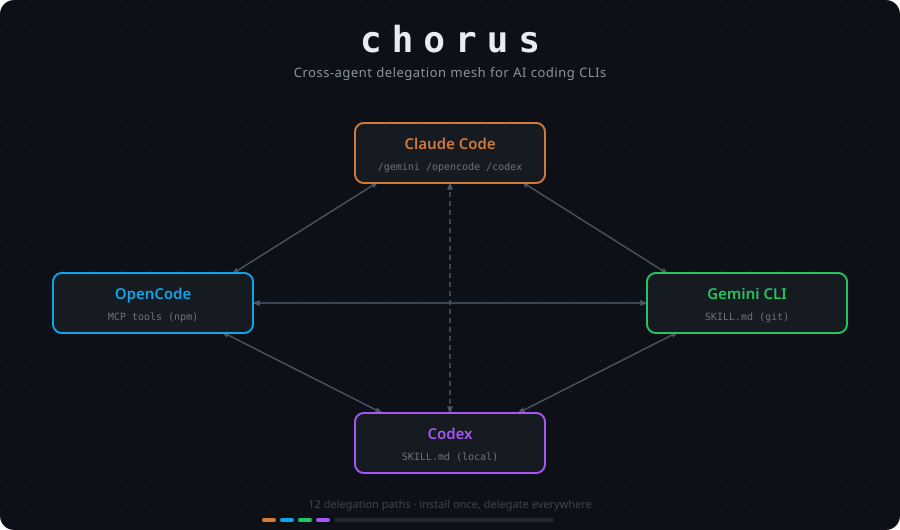
<p>chorus — open-source колекція плагінів, яка створює <strong>mesh делегування 4×3</strong> між чотирма AI coding CLI:</p>

<table>
  <thead>
    <tr>
      <th>Від \ До</th>
      <th>Claude</th>
      <th>OpenCode</th>
      <th>Gemini</th>
      <th>Codex</th>
    </tr>
  </thead>
  <tbody>
    <tr>
      <td>Claude Code</td>
      <td>—</td>
      <td>✅</td>
      <td>✅</td>
      <td>✅</td>
    </tr>
    <tr>
      <td>OpenCode</td>
      <td>✅</td>
      <td>—</td>
      <td>✅</td>
      <td>✅</td>
    </tr>
    <tr>
      <td>Gemini CLI</td>
      <td>✅</td>
      <td>✅</td>
      <td>—</td>
      <td>✅</td>
    </tr>
    <tr>
      <td>Codex</td>
      <td>✅</td>
      <td>✅</td>
      <td>✅</td>
      <td>—</td>
    </tr>
  </tbody>
</table>

<p>Кожен агент може делегувати задачі трьом іншим, не виходячи зі свого інтерфейсу.</p>

<h2 id="інтеграція">Інтеграція</h2>

<p><strong>Claude Code</strong> отримує slash commands:</p>
<div class="language-plaintext highlighter-rouge"><div class="highlight"><pre class="highlight"><code>/opencode:run refactor the auth module
/gemini:review check this diff for edge cases
/codex:run write tests for the new retry logic
</code></pre></div></div>

<p><strong>OpenCode</strong> отримує MCP tools:</p>
<div class="language-plaintext highlighter-rouge"><div class="highlight"><pre class="highlight"><code>delegate_claude("review this migration for data loss risk")
delegate_gemini("analyze this for performance bottlenecks")
delegate_codex("add integration tests")
</code></pre></div></div>

<p><strong>Gemini CLI</strong> і <strong>Codex</strong> отримують skills — встановіть раз, потім просто скажіть агенту делегувати природною мовою.</p>

<h2 id="workflow-який-реально-важливий">Workflow, який реально важливий</h2>

<p>Паралельне code review. Даєте трьом різним агентам один diff незалежно, кожен із різним фокусом:</p>

<div class="language-text highlighter-rouge"><div class="highlight"><pre class="highlight"><code>/gemini:review — correctness та edge cases
/codex:run    — test coverage
/opencode:run — архітектура та спрощення
</code></pre></div></div>

<p>У різних моделей різні слабкі місця. Один пропустить edge case, який інший спіймає. Один перебільшить архітектурні деталі, де інший помітить відсутній тест. Ви читаєте всі три відповіді й приймаєте рішення. Агенти надають матеріал, judgment залишається за вами.</p>

<h2 id="встановлення">Встановлення</h2>

<div class="language-bash highlighter-rouge"><div class="highlight"><pre class="highlight"><code><span class="c"># Claude Code</span>
claude plugin <span class="nb">install </span>https://github.com/valpere/chorus

<span class="c"># OpenCode</span>
opencode plugin @valpere/chorus-opencode
</code></pre></div></div>

<p>Повне встановлення для Gemini CLI та Codex — у README.</p>

<p>chorus не намагається стати новою IDE або orchestration platform. Це plumbing між інструментами, якими розробники вже користуються. Одна інсталяція, чотири агенти, жодних нових workflow.</p>

<p><strong><a href="https://github.com/valpere/chorus">https://github.com/valpere/chorus</a></strong></p>]]></content><author><name></name></author><category term="release-notes" /><category term="AI" /><category term="chorus" /><category term="claude-code" /><category term="opencode" /><category term="gemini" /><category term="codex" /><category term="open-source" /><summary type="html"><![CDATA[chorus — open-source колекція плагінів, яка створює mesh делегування 4×3 між Claude Code, OpenCode, Gemini CLI та Codex, не виходячи з поточного інтерфейсу.]]></summary><media:thumbnail xmlns:media="http://search.yahoo.com/mrss/" url="https://valpere.github.io/assets/images/posts/chorus/infographic-900x530.png" /><media:content medium="image" url="https://valpere.github.io/assets/images/posts/chorus/infographic-900x530.png" xmlns:media="http://search.yahoo.com/mrss/" /></entry><entry xml:lang="en"><title type="html">Claude Code in Freelance: How I Ship Faster Without Cutting Corners</title><link href="https://valpere.github.io/uk/blog/2026/04/01/claude-code-freelance-workflow/" rel="alternate" type="text/html" title="Claude Code in Freelance: How I Ship Faster Without Cutting Corners" /><published>2026-04-01T00:00:00+00:00</published><updated>2026-04-01T00:00:00+00:00</updated><id>https://valpere.github.io/blog/2026/04/01/claude-code-freelance-workflow</id><content type="html" xml:base="https://valpere.github.io/blog/2026/04/01/claude-code-freelance-workflow/"><![CDATA[<p><img src="/projects/assets/images/vibe_coding/ai+low-code_fusion-1-0768x0512.png" alt="AI and low-code fusion in freelance workflow" /></p>

<p>Six months ago I started using Claude Code as a primary development tool on client work. Not as an autocomplete or a rubber duck, but as a structured part of a repeatable workflow. Here is what that actually looks like in practice — with the warts included.</p>

<h2 id="the-workflow-in-four-stages">The Workflow in Four Stages</h2>

<p><strong>Stage 1: Planning.</strong> Before any code is written I produce a spec. Not a vague description — a numbered task list with acceptance criteria per task. Claude Code can operate well on a clear task, and it operates poorly on a hazy one. This stage is still 100% human; the AI has no place here until you know what you want.</p>

<p><strong>Stage 2: Worktrees.</strong> Each task gets its own Git worktree (<code class="language-plaintext highlighter-rouge">git worktree add</code>). This is the part most people skip, and skipping it is why AI-assisted projects turn into spaghetti. Worktrees give each subagent a clean checkout with no side effects from other in-flight tasks.</p>

<p><strong>Stage 3: Subagent-driven development.</strong> I invoke Claude Code in each worktree with a tightly scoped prompt: one task, one context window, one outcome. The context isolation is not a limitation — it is the feature. A subagent that cannot see the rest of your codebase cannot make assumptions about it. That forces the prompt to be complete.</p>

<p><strong>Stage 4: Two-stage review.</strong> Every task gets reviewed twice. First pass: does the implementation match the spec? Second pass: code quality — naming, complexity, whether anything was invented that was not asked for (YAGNI violations are common in AI output). I use GitHub Copilot’s PR review for the second pass and have Claude Code apply the fixes. The combination works well: Copilot flags issues, Claude Code fixes them without arguing.</p>

<h2 id="a-real-example-valperegithubio-phase-1">A Real Example: valpere.github.io Phase 1</h2>

<p>My own site rebuild had 11 defined tasks — layout system, SCSS override, polyglot integration, portfolio pages, project pages, and so on. Each task was one worktree, one subagent invocation, one PR. Total wall-clock time across 11 tasks was roughly three days of calendar time, with maybe four hours of active human attention.</p>

<p>Two tasks that looked simple turned out to need careful prompting:</p>

<ul>
  <li>
    <p><strong>SCSS override for Minima.</strong> Minima injects its own <code class="language-plaintext highlighter-rouge">assets/main.scss</code> via the gem. If your project also has <code class="language-plaintext highlighter-rouge">assets/main.scss</code>, Jekyll uses yours — but only if it has the right <code class="language-plaintext highlighter-rouge">@import</code> statements. The gotcha: the generated <code class="language-plaintext highlighter-rouge">_site/assets/main.scss</code> was empty on first run because the subagent created the file without importing anything. The fix was trivial once diagnosed, but the subagent had no way to know Minima’s convention without being told.</p>
  </li>
  <li>
    <p><strong>Polyglot language switcher.</strong> <code class="language-plaintext highlighter-rouge">jekyll-polyglot</code> rewrites root-relative hrefs on non-default language pages. A language switcher that links to <code class="language-plaintext highlighter-rouge">/about/</code> will rewrite to <code class="language-plaintext highlighter-rouge">/uk/about/</code> when rendering the Ukrainian version — including the link that is supposed to stay on the same page. The solution is <code class="language-plaintext highlighter-rouge">static_href</code> Liquid tags, which polyglot explicitly skips. But the subagent used standard <code class="language-plaintext highlighter-rouge">&lt;a href&gt;</code> because that is the obvious thing to do. The prompt needed to say “use static_href for the language switcher links” explicitly.</p>
  </li>
</ul>

<h2 id="the-copilot--claude-combination">The Copilot + Claude Combination</h2>

<p>GitHub Copilot’s PR review is good at catching style issues and potential bugs in isolation. Claude Code is good at applying fixes in context. Running both on every PR takes maybe ten extra minutes per task and has caught real problems — duplicate logic, missing error handling, and one case where the subagent added a configuration option nobody asked for.</p>

<h2 id="the-real-gotchas">The Real Gotchas</h2>

<p>The most painful non-code issue: my global <code class="language-plaintext highlighter-rouge">~/.gitignore_global</code> had an <code class="language-plaintext highlighter-rouge">_*</code> pattern to ignore scratch directories. Jekyll’s <code class="language-plaintext highlighter-rouge">_layouts/</code>, <code class="language-plaintext highlighter-rouge">_includes/</code>, <code class="language-plaintext highlighter-rouge">_data/</code>, and <code class="language-plaintext highlighter-rouge">_posts/</code> all match that pattern. The worktrees looked clean but were missing critical directories. This took about an hour to diagnose because <code class="language-plaintext highlighter-rouge">git status</code> showed nothing wrong — the files were not untracked, they were invisible.</p>

<h2 id="the-tradeoff">The Tradeoff</h2>

<p>Subagents need precise prompts. That is both the cost and the discipline. Writing a precise prompt forces you to actually think through the task before coding it, which is not a bad habit regardless of tooling. The context isolation means no agent accumulates state or makes cross-task assumptions. You give up the convenience of “the AI remembers what we discussed” and gain reproducibility.</p>

<p>If a task requires subtle judgment about cross-cutting concerns — security, data modeling, novel algorithms — I write that code myself. AI is a force multiplier on execution, not a replacement for design.</p>]]></content><author><name></name></author><category term="ai-practice" /><category term="claude-code" /><category term="ai" /><category term="workflow" /><category term="freelance" /><summary type="html"><![CDATA[How I integrated Claude Code's subagent-driven development into real freelance projects — concrete workflow, lessons, and tradeoffs.]]></summary><media:thumbnail xmlns:media="http://search.yahoo.com/mrss/" url="https://valpere.github.io/projects/assets/images/vibe_coding/ai+low-code_fusion-1-0768x0512.png" /><media:content medium="image" url="https://valpere.github.io/projects/assets/images/vibe_coding/ai+low-code_fusion-1-0768x0512.png" xmlns:media="http://search.yahoo.com/mrss/" /></entry><entry xml:lang="en"><title type="html">DataScrapexter: Architecture of a Production Go Scraping Framework</title><link href="https://valpere.github.io/uk/blog/2026/04/01/datascrapexter-architecture/" rel="alternate" type="text/html" title="DataScrapexter: Architecture of a Production Go Scraping Framework" /><published>2026-04-01T00:00:00+00:00</published><updated>2026-04-01T00:00:00+00:00</updated><id>https://valpere.github.io/blog/2026/04/01/datascrapexter-architecture</id><content type="html" xml:base="https://valpere.github.io/blog/2026/04/01/datascrapexter-architecture/"><![CDATA[<p><img src="/projects/assets/images/data_scrapexter/professional_web_scraping_solution-1-0768x0512.png" alt="DataScrapexter — professional web scraping solution" /></p>

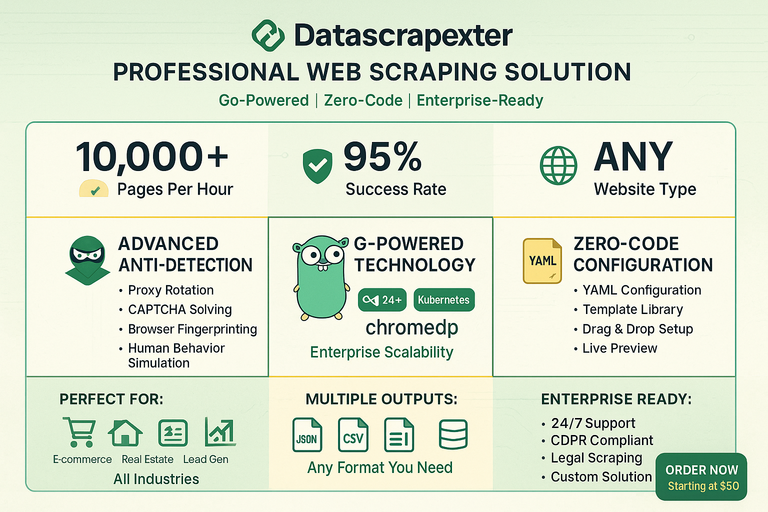
<p>Most scraping tools are either a thin wrapper around an HTTP client or a full browser automation harness. DataScrapexter sits between those extremes deliberately, and the architecture reflects that choice.</p>

<h2 id="the-four-tier-service-model">The Four-Tier Service Model</h2>

<p>DataScrapexter is offered as a tiered service, and the tiers are not just pricing — they correspond to meaningfully different technical configurations:</p>

<ul>
  <li><strong>Basic</strong>: Static HTML sites. Colly handles fetch and parse; no browser involved.</li>
  <li><strong>Standard</strong>: Sites with light JavaScript rendering. Colly fetches; a small post-processing step handles common SPA patterns like <code class="language-plaintext highlighter-rouge">&lt;script type="application/json"&gt;</code> data islands.</li>
  <li><strong>Professional</strong>: Full JS rendering required. <code class="language-plaintext highlighter-rouge">chromedp</code> drives a headless Chromium instance; Colly is not involved in the fetch path.</li>
  <li><strong>Enterprise</strong>: Anti-bot bypass, residential proxy rotation, CAPTCHA solving, custom extraction logic. The pipeline is the Professional tier plus a detection-bypass middleware layer.</li>
</ul>

<p>This tiering is reflected in the codebase as a factory pattern: a <code class="language-plaintext highlighter-rouge">FetcherFactory</code> takes a config struct and returns a <code class="language-plaintext highlighter-rouge">Fetcher</code> interface. The caller never instantiates Colly or chromedp directly.</p>

<h2 id="the-pipeline">The Pipeline</h2>

<p><img src="/projects/assets/images/data_scrapexter/configuration_workflow_diagram-1-0768x0512.png" alt="Configuration workflow diagram" /></p>

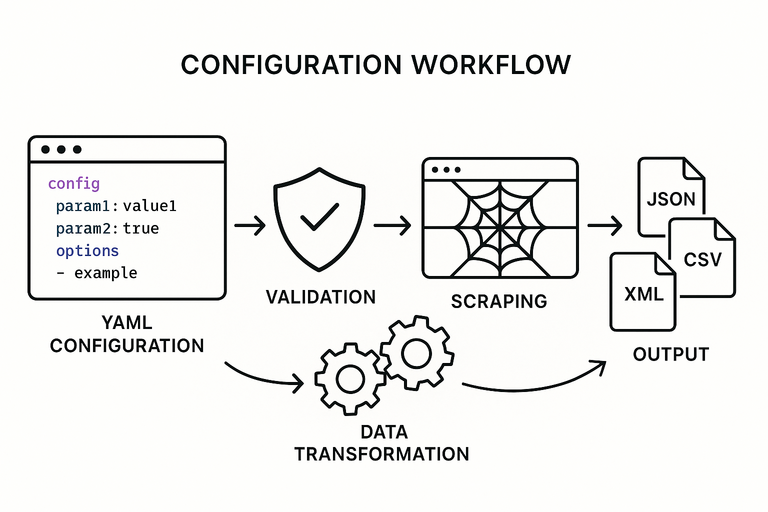
<p>Every request flows through five stages regardless of tier:</p>

<div class="language-plaintext highlighter-rouge"><div class="highlight"><pre class="highlight"><code>Fetcher → Detector Bypass → Extractor → Normalizer → Formatter
</code></pre></div></div>

<p><strong>Fetcher</strong> handles the HTTP lifecycle — connection pooling, retry logic, rate limiting, and cookie jar management. For Colly-backed tiers, this wraps <code class="language-plaintext highlighter-rouge">colly.Collector</code> with additional middleware. For chromedp tiers, it wraps a <code class="language-plaintext highlighter-rouge">chromedp.Context</code> with page lifecycle hooks (wait for network idle, scroll to trigger lazy loads, etc.).</p>

<p><strong>Detector Bypass</strong> is a no-op in Basic/Standard tiers. In Professional and Enterprise it injects realistic browser fingerprints: User-Agent rotation, <code class="language-plaintext highlighter-rouge">Accept-Language</code>, TLS fingerprint normalization, and timing jitter between requests. The middleware is a chain of <code class="language-plaintext highlighter-rouge">func(req *Request) error</code> steps, so individual bypass techniques can be swapped or composed without touching surrounding code.</p>

<p><strong>Extractor</strong> takes the raw HTML (or DOM snapshot from chromedp) and applies CSS selectors or XPath expressions defined in a scraping config file (YAML or JSON). The config schema is the same across all tiers. An extractor produces a <code class="language-plaintext highlighter-rouge">map[string]interface{}</code> per scraped entity.</p>

<p><strong>Normalizer</strong> applies type coercion, cleaning rules (trim whitespace, strip HTML tags, parse prices/dates), and field renaming. The normalization rules live in the same config file as the selectors, under a <code class="language-plaintext highlighter-rouge">transforms</code> key.</p>

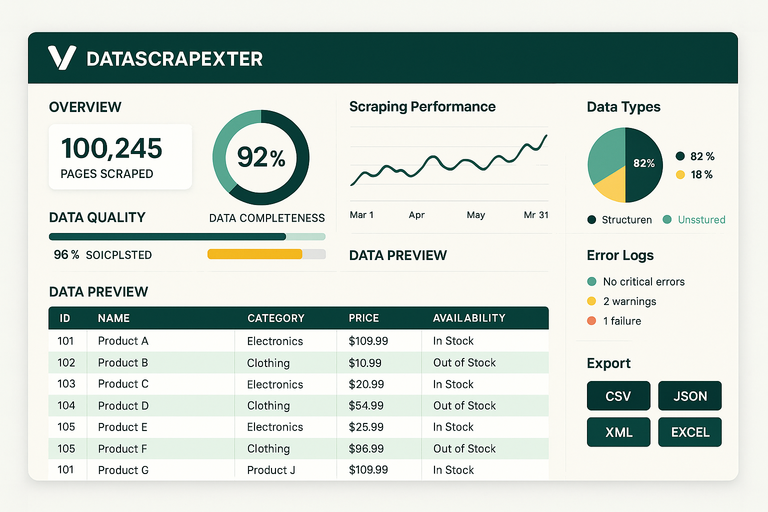
<p><strong>Formatter</strong> serializes to the requested output: JSON, CSV, or XLSX. Each format has its own <code class="language-plaintext highlighter-rouge">Formatter</code> implementation behind a <code class="language-plaintext highlighter-rouge">format.Formatter</code> interface. Adding a new output format is a single struct implementing two methods.</p>

<h2 id="concurrency-model">Concurrency Model</h2>

<p>DataScrapexter uses a worker pool pattern with configurable parallelism:</p>

<div class="language-go highlighter-rouge"><div class="highlight"><pre class="highlight"><code><span class="n">pool</span> <span class="o">:=</span> <span class="n">scraper</span><span class="o">.</span><span class="n">NewWorkerPool</span><span class="p">(</span><span class="n">cfg</span><span class="o">.</span><span class="n">Workers</span><span class="p">,</span> <span class="n">fetcher</span><span class="p">,</span> <span class="n">extractor</span><span class="p">)</span>
<span class="n">pool</span><span class="o">.</span><span class="n">Submit</span><span class="p">(</span><span class="n">urls</span><span class="p">)</span>
<span class="n">results</span> <span class="o">:=</span> <span class="n">pool</span><span class="o">.</span><span class="n">Drain</span><span class="p">()</span>
</code></pre></div></div>

<p><code class="language-plaintext highlighter-rouge">Workers</code> defaults to 5 for Basic, 3 for Professional (chromedp instances are heavier), and is user-configurable up to tier limits. The pool manages a <code class="language-plaintext highlighter-rouge">semaphore</code> channel to cap goroutines and a <code class="language-plaintext highlighter-rouge">results</code> channel that the formatter drains. Errors are collected separately and reported after all URLs are processed.</p>

<h2 id="why-colly-and-chromedp-coexist">Why Colly and chromedp Coexist</h2>

<p>The obvious question is why not use chromedp for everything. Two reasons:</p>

<ol>
  <li>
    <p><strong>Performance.</strong> A Colly-based fetch completes in ~50ms per page. A chromedp fetch, including browser launch amortization, is closer to 500ms with a warm pool. For a job scraping 10,000 product pages, that difference is roughly 11 hours.</p>
  </li>
  <li>
    <p><strong>Detectability.</strong> Headless browsers have well-known fingerprints. Running chromedp against a site that does not need JS rendering increases detection risk without benefit.</p>
  </li>
</ol>

<p>The factory pattern means the calling code is identical regardless of which fetcher is active. Switching a site from Colly to chromedp is a one-line config change.</p>

<h2 id="config-driven-design">Config-Driven Design</h2>

<p>The entire extraction logic is in YAML, not code. A client can change selectors, add fields, or adjust normalization rules without a deployment. This was a deliberate design decision: the framework is a runtime that interprets scraping specs, not a collection of site-specific scrapers baked into the binary.</p>

<div class="language-yaml highlighter-rouge"><div class="highlight"><pre class="highlight"><code><span class="na">site</span><span class="pi">:</span> <span class="s">example-shop</span>
<span class="na">base_url</span><span class="pi">:</span> <span class="s">https://example.com/products</span>
<span class="na">pagination</span><span class="pi">:</span>
  <span class="na">selector</span><span class="pi">:</span> <span class="s2">"</span><span class="s">a.next-page"</span>
  <span class="na">max_pages</span><span class="pi">:</span> <span class="m">50</span>
<span class="na">fields</span><span class="pi">:</span>
  <span class="pi">-</span> <span class="na">name</span><span class="pi">:</span> <span class="s">title</span>
    <span class="na">selector</span><span class="pi">:</span> <span class="s2">"</span><span class="s">h1.product-title"</span>
  <span class="pi">-</span> <span class="na">name</span><span class="pi">:</span> <span class="s">price</span>
    <span class="na">selector</span><span class="pi">:</span> <span class="s2">"</span><span class="s">span.price"</span>
    <span class="na">transform</span><span class="pi">:</span> <span class="s">parse_price</span>
  <span class="pi">-</span> <span class="na">name</span><span class="pi">:</span> <span class="s">sku</span>
    <span class="na">selector</span><span class="pi">:</span> <span class="s2">"</span><span class="s">[data-sku]"</span>
    <span class="na">attribute</span><span class="pi">:</span> <span class="s">data-sku</span>
<span class="na">output</span><span class="pi">:</span>
  <span class="na">format</span><span class="pi">:</span> <span class="s">csv</span>
  <span class="na">path</span><span class="pi">:</span> <span class="s">./output/products.csv</span>
</code></pre></div></div>

<p>This approach keeps the core framework stable while client-specific logic stays in version-controlled config files rather than forked code.</p>

<p><img src="/projects/assets/images/data_scrapexter/data_output_visualization-1-0768x0512.png" alt="Data output visualization" /></p>]]></content><author><name></name></author><category term="deep-dive" /><category term="go" /><category term="scraping" /><category term="architecture" /><category term="colly" /><summary type="html"><![CDATA[A walkthrough of DataScrapexter's layered Go architecture — from request management to anti-detection to multi-format output.]]></summary><media:thumbnail xmlns:media="http://search.yahoo.com/mrss/" url="https://valpere.github.io/projects/assets/images/data_scrapexter/professional_web_scraping_solution-1-0768x0512.png" /><media:content medium="image" url="https://valpere.github.io/projects/assets/images/data_scrapexter/professional_web_scraping_solution-1-0768x0512.png" xmlns:media="http://search.yahoo.com/mrss/" /></entry><entry xml:lang="en"><title type="html">Automating KeepinCRM: From Manual Order Tracking to Zero-Touch Fulfillment</title><link href="https://valpere.github.io/uk/blog/2026/03/15/keepincrm-automation/" rel="alternate" type="text/html" title="Automating KeepinCRM: From Manual Order Tracking to Zero-Touch Fulfillment" /><published>2026-03-15T00:00:00+00:00</published><updated>2026-03-15T00:00:00+00:00</updated><id>https://valpere.github.io/blog/2026/03/15/keepincrm-automation</id><content type="html" xml:base="https://valpere.github.io/blog/2026/03/15/keepincrm-automation/"><![CDATA[<p><img src="/projects/assets/images/keepincrm/keepincrm_en-1-0632x0424.png" alt="KeepinCRM automation" /></p>

<p>The client runs a small e-commerce operation — handmade goods, 50 to 80 orders on a busy day. Every morning started the same way: open Nova Poshta, check each tracking number, open KeepinCRM, move each deal to the matching stage. Forty-five minutes, every day, on a task a machine should own.</p>

<h2 id="the-problem">The Problem</h2>

<p>Manual order tracking at that volume is not just tedious — it is error-prone. Missed status changes meant delayed follow-ups. Parcels returned to sender because nobody noticed the “storage expires in 2 days” status until day three. Fiscal receipts were generated manually after confirmation of delivery, which sometimes meant forgetting entirely.</p>

<p>The client had KeepinCRM configured with deal stages that mapped directly to parcel lifecycle states: <code class="language-plaintext highlighter-rouge">Shipped</code>, <code class="language-plaintext highlighter-rouge">In Transit</code>, <code class="language-plaintext highlighter-rouge">Awaiting Pickup</code>, <code class="language-plaintext highlighter-rouge">Delivered</code>, <code class="language-plaintext highlighter-rouge">Return Initiated</code>, <code class="language-plaintext highlighter-rouge">Returned</code>. The mapping was clear. The problem was that someone had to perform it manually, twice a day.</p>

<h2 id="the-solution">The Solution</h2>

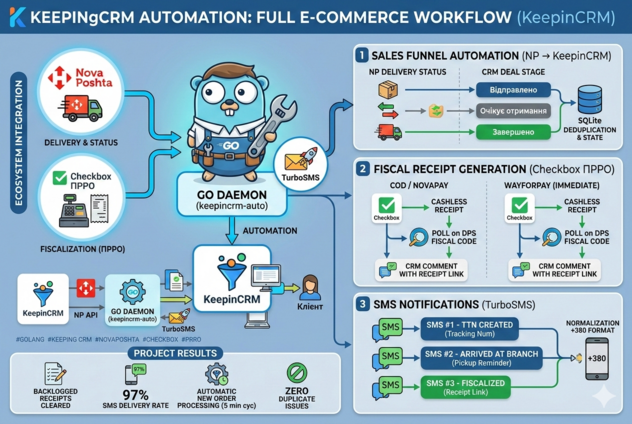
<p>A Go daemon running on a small VPS, polling Nova Poshta’s tracking API every 30 minutes and driving a pipeline of three downstream actions.</p>

<h3 id="stage-1-nova-poshta-polling">Stage 1: Nova Poshta Polling</h3>

<p>Nova Poshta provides a JSON API for tracking. The daemon maintains a SQLite table of active tracking numbers with their last known status. On each poll cycle:</p>

<div class="language-go highlighter-rouge"><div class="highlight"><pre class="highlight"><code><span class="n">statuses</span><span class="p">,</span> <span class="n">err</span> <span class="o">:=</span> <span class="n">np</span><span class="o">.</span><span class="n">GetTrackingStatuses</span><span class="p">(</span><span class="n">ctx</span><span class="p">,</span> <span class="n">activeTTNs</span><span class="p">)</span>
<span class="k">for</span> <span class="n">_</span><span class="p">,</span> <span class="n">s</span> <span class="o">:=</span> <span class="k">range</span> <span class="n">statuses</span> <span class="p">{</span>
    <span class="k">if</span> <span class="n">s</span><span class="o">.</span><span class="n">StatusCode</span> <span class="o">!=</span> <span class="n">cache</span><span class="o">.</span><span class="n">Get</span><span class="p">(</span><span class="n">s</span><span class="o">.</span><span class="n">TTN</span><span class="p">)</span> <span class="p">{</span>
        <span class="n">events</span> <span class="o">&lt;-</span> <span class="n">TrackingEvent</span><span class="p">{</span><span class="n">TTN</span><span class="o">:</span> <span class="n">s</span><span class="o">.</span><span class="n">TTN</span><span class="p">,</span> <span class="n">OldStatus</span><span class="o">:</span> <span class="n">cache</span><span class="o">.</span><span class="n">Get</span><span class="p">(</span><span class="n">s</span><span class="o">.</span><span class="n">TTN</span><span class="p">),</span> <span class="n">NewStatus</span><span class="o">:</span> <span class="n">s</span><span class="o">.</span><span class="n">StatusCode</span><span class="p">}</span>
        <span class="n">cache</span><span class="o">.</span><span class="n">Set</span><span class="p">(</span><span class="n">s</span><span class="o">.</span><span class="n">TTN</span><span class="p">,</span> <span class="n">s</span><span class="o">.</span><span class="n">StatusCode</span><span class="p">)</span>
    <span class="p">}</span>
<span class="p">}</span>
</code></pre></div></div>

<p>Nova Poshta’s status codes are numeric. The daemon maps them to KeepinCRM stage names via a config file — the client can adjust the mapping without a code change.</p>

<h3 id="stage-2-keepincrm-pipeline">Stage 2: KeepinCRM Pipeline</h3>

<p>KeepinCRM has a REST API for deal management. When a tracking event arrives, the daemon finds the deal associated with that tracking number (stored at deal creation time as a custom field) and moves it to the target stage:</p>

<div class="language-go highlighter-rouge"><div class="highlight"><pre class="highlight"><code><span class="n">dealID</span><span class="p">,</span> <span class="n">err</span> <span class="o">:=</span> <span class="n">crm</span><span class="o">.</span><span class="n">FindDealByTTN</span><span class="p">(</span><span class="n">ctx</span><span class="p">,</span> <span class="n">event</span><span class="o">.</span><span class="n">TTN</span><span class="p">)</span>
<span class="k">if</span> <span class="n">err</span> <span class="o">!=</span> <span class="no">nil</span> <span class="p">{</span> <span class="n">log</span><span class="o">.</span><span class="n">Error</span><span class="p">(</span><span class="o">...</span><span class="p">);</span> <span class="k">continue</span> <span class="p">}</span>
<span class="n">err</span> <span class="o">=</span> <span class="n">crm</span><span class="o">.</span><span class="n">MoveDeal</span><span class="p">(</span><span class="n">ctx</span><span class="p">,</span> <span class="n">dealID</span><span class="p">,</span> <span class="n">stageMap</span><span class="p">[</span><span class="n">event</span><span class="o">.</span><span class="n">NewStatus</span><span class="p">])</span>
</code></pre></div></div>

<p>If <code class="language-plaintext highlighter-rouge">FindDealByTTN</code> returns nothing — the deal was closed, archived, or the TTN was entered incorrectly — the event is logged and a Telegram message is sent to the client’s ops chat. No silent failures.</p>

<h3 id="stage-3-fiscal-receipts-via-checkbox">Stage 3: Fiscal Receipts via Checkbox</h3>

<p>Ukraine requires fiscal receipts for retail sales. The client was using Checkbox, which has an API for programmatic receipt generation. When a deal moves to <code class="language-plaintext highlighter-rouge">Delivered</code>, the daemon fetches the deal’s line items from KeepinCRM and fires a receipt creation request to Checkbox:</p>

<div class="language-go highlighter-rouge"><div class="highlight"><pre class="highlight"><code><span class="k">if</span> <span class="n">event</span><span class="o">.</span><span class="n">NewStatus</span> <span class="o">==</span> <span class="n">StatusDelivered</span> <span class="p">{</span>
    <span class="n">items</span><span class="p">,</span> <span class="n">err</span> <span class="o">:=</span> <span class="n">crm</span><span class="o">.</span><span class="n">GetDealLineItems</span><span class="p">(</span><span class="n">ctx</span><span class="p">,</span> <span class="n">dealID</span><span class="p">)</span>
    <span class="n">receiptID</span><span class="p">,</span> <span class="n">err</span> <span class="o">:=</span> <span class="n">checkbox</span><span class="o">.</span><span class="n">CreateReceipt</span><span class="p">(</span><span class="n">ctx</span><span class="p">,</span> <span class="n">items</span><span class="p">,</span> <span class="n">deal</span><span class="o">.</span><span class="n">CustomerPhone</span><span class="p">)</span>
    <span class="n">crm</span><span class="o">.</span><span class="n">AddNote</span><span class="p">(</span><span class="n">ctx</span><span class="p">,</span> <span class="n">dealID</span><span class="p">,</span> <span class="s">"Fiscal receipt: "</span><span class="o">+</span><span class="n">receiptID</span><span class="p">)</span>
<span class="p">}</span>
</code></pre></div></div>

<p>The receipt ID is written back to KeepinCRM as a deal note. The client can pull it up immediately if a customer asks.</p>

<h3 id="stage-4-turbosms-notification">Stage 4: TurboSMS Notification</h3>

<p>The final step sends an SMS to the customer when the parcel status changes to <code class="language-plaintext highlighter-rouge">Awaiting Pickup</code> — the most time-sensitive notification, since Nova Poshta storage is limited to five business days.</p>

<p>TurboSMS has a straightforward HTTP API. The message template is configurable:</p>

<div class="language-plaintext highlighter-rouge"><div class="highlight"><pre class="highlight"><code>Your order #{order_id} is waiting at {branch_address}. 
Storage until {expiry_date}. Track: https://novaposhta.ua/tracking/#{ttn}
</code></pre></div></div>

<p>The branch address and storage expiry date come from the Nova Poshta tracking response.</p>

<h2 id="results">Results</h2>

<p>After two weeks of running in parallel with manual tracking (to validate correctness), the client switched to fully automated operation:</p>

<ul>
  <li><strong>Zero manual deal moves</strong> since go-live. The daemon processes 150–200 tracking events per day.</li>
  <li><strong>Fiscal receipts generated automatically</strong> for every delivered order. Previously, about 15% were missed or delayed.</li>
  <li><strong>Approximately 2 hours per day recovered</strong> — the morning tracking session and an afternoon check-in that were both eliminated.</li>
  <li><strong>Two return-to-sender events caught early</strong> in the first month that would have been missed under the manual process.</li>
</ul>

<p>The daemon has been running for four months. The only operational intervention was a Nova Poshta API schema change that broke status code parsing for three hours — caught via Telegram alert, fixed with a config update, no data loss.</p>]]></content><author><name></name></author><category term="case-study" /><category term="go" /><category term="crm" /><category term="automation" /><category term="nova-poshta" /><category term="telegram" /><summary type="html"><![CDATA[How a Go daemon watches Nova Poshta parcel statuses, moves CRM deals automatically, generates fiscal receipts, and sends SMS notifications.]]></summary><media:thumbnail xmlns:media="http://search.yahoo.com/mrss/" url="https://valpere.github.io/projects/assets/images/keepincrm/keepincrm_en-1-0632x0424.png" /><media:content medium="image" url="https://valpere.github.io/projects/assets/images/keepincrm/keepincrm_en-1-0632x0424.png" xmlns:media="http://search.yahoo.com/mrss/" /></entry><entry xml:lang="en"><title type="html">Vibe Coding Without Vibes: Keeping Engineering Standards While Using AI</title><link href="https://valpere.github.io/uk/blog/2026/03/01/vibe-coding-methodology/" rel="alternate" type="text/html" title="Vibe Coding Without Vibes: Keeping Engineering Standards While Using AI" /><published>2026-03-01T00:00:00+00:00</published><updated>2026-03-01T00:00:00+00:00</updated><id>https://valpere.github.io/blog/2026/03/01/vibe-coding-methodology</id><content type="html" xml:base="https://valpere.github.io/blog/2026/03/01/vibe-coding-methodology/"><![CDATA[<p><img src="/projects/assets/images/vibe_coding/vibe_coding-1-0768x0512.png" alt="Vibe coding with AI tools" /></p>

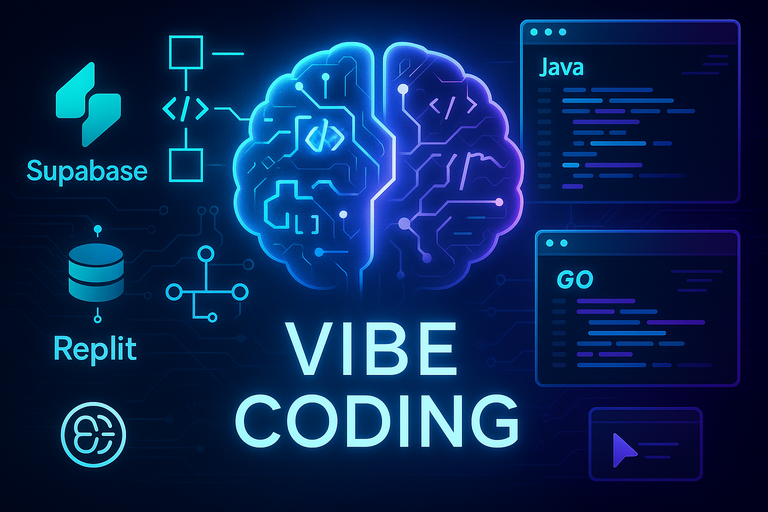
<p>Vibe coding — the practice of describing what you want and letting an AI generate the implementation — is real and productive. It is also a reliable way to accumulate technical debt at AI speed if you treat the AI as a replacement for engineering discipline rather than an accelerant.</p>

<p>The issue is not the AI. The issue is that the habits that make hand-written code maintainable do not enforce themselves just because you switched to prompted code.</p>

<h2 id="yagni-still-applies">YAGNI Still Applies</h2>

<p>AI models are trained to be helpful. When you ask for a user authentication system, a helpful model will often give you authentication plus password reset, plus session management, plus an admin flag on the user model, plus email verification — because those things often go together and the model is pattern-matching on codebases where they do.</p>

<p>This is YAGNI violation at generation speed. You did not ask for those things, you do not need them yet, and now they are in your codebase requiring maintenance, testing, and decision-making.</p>

<p>The fix is specificity in prompts. “Implement JWT authentication — just the middleware that validates a token and sets a context value, nothing else” produces a dramatically different result than “implement authentication.”</p>

<h2 id="specs-before-code">Specs Before Code</h2>

<p>The most productive use of AI in development is not asking it to figure out what to build. It is asking it to build a thing you have already figured out. This means writing a spec first.</p>

<p>A spec does not need to be elaborate. For a single task it might be four bullet points:</p>

<div class="language-plaintext highlighter-rouge"><div class="highlight"><pre class="highlight"><code>- Accept a POST /webhooks/stripe body
- Validate the Stripe-Signature header using STRIPE_WEBHOOK_SECRET from env
- On payment_intent.succeeded, call OrderService.MarkPaid(paymentIntentID)
- Return 200 on success, 400 on invalid signature, 500 on internal error
</code></pre></div></div>

<p>That spec constrains the AI to what you actually want. Without it, the model will make choices — about error handling, about what to log, about whether to add a retry queue — and some of those choices will be wrong for your context.</p>

<h2 id="review-still-matters">Review Still Matters</h2>

<p>AI output requires the same code review scrutiny as output from a junior developer. The AI does not know your conventions, your security model, or what you decided last sprint. It knows common patterns, which is not the same thing.</p>

<p>Things to specifically look for in AI-generated code:</p>

<ul>
  <li><strong>Invented abstractions.</strong> A function that was supposed to fetch a user instead returns a result type with three fields, two of which you did not ask for and one of which shadows a name in an outer scope.</li>
  <li><strong>Inconsistent error handling.</strong> The happy path is fine; the AI often gets bored with error handling and uses a different pattern for the third error case.</li>
  <li><strong>Missing input validation.</strong> AI will validate inputs that appear in its training data for similar functions. It will skip validation for inputs that seem “internal” to the application.</li>
  <li><strong>Silent failure modes.</strong> Goroutines that panic without recovery, channels that can deadlock, contexts that are not propagated.</li>
</ul>

<h2 id="the-subagent-pattern">The Subagent Pattern</h2>

<p>One long conversation with an AI is a trap. The model’s context window fills with earlier decisions, and later outputs are implicitly constrained by them — including bad decisions made early that were never corrected.</p>

<p>The subagent pattern: one task, one fresh context, one review. Isolate each task into a focused prompt that includes everything the AI needs and nothing it does not. This produces more predictable output and makes it easier to review because the scope is bounded.</p>

<p>In practice this means using <code class="language-plaintext highlighter-rouge">git worktrees</code> per task and invoking a new Claude Code session per worktree. The overhead is low; the predictability gain is significant.</p>

<h2 id="when-not-to-use-ai">When Not to Use AI</h2>

<p>There are categories of code where AI assistance is actively harmful:</p>

<p><strong>Security-sensitive code.</strong> Authentication flows, cryptographic operations, access control checks. These require getting the exact right thing right the first time. AI will produce plausible-looking code that has subtle flaws — timing attacks, missing validation in edge cases, incorrect use of a crypto primitive. Read the spec, implement it yourself, have a second human review it.</p>

<p><strong>Novel algorithms.</strong> If the algorithm you need does not exist in common form in AI training data, the AI will approximate it with something that looks similar but is not correct. This is the worst failure mode: code that looks right, passes obvious tests, and fails in production on edge cases.</p>

<p><strong>Regulatory compliance logic.</strong> Tax calculations, GDPR right-to-erasure implementation, financial rounding rules. The consequences of getting these wrong are not a debugging session; they are legal or financial exposure. Understand the spec yourself.</p>

<p>AI is a genuine productivity multiplier for the large majority of implementation work that is routine. The discipline is knowing which parts are not routine.</p>]]></content><author><name></name></author><category term="methodology" /><category term="ai" /><category term="methodology" /><category term="vibe-coding" /><category term="claude" /><category term="cursor" /><summary type="html"><![CDATA[Why AI-assisted development needs the same engineering discipline as hand-written code — and the practices that keep it maintainable.]]></summary><media:thumbnail xmlns:media="http://search.yahoo.com/mrss/" url="https://valpere.github.io/projects/assets/images/vibe_coding/vibe_coding-1-0768x0512.png" /><media:content medium="image" url="https://valpere.github.io/projects/assets/images/vibe_coding/vibe_coding-1-0768x0512.png" xmlns:media="http://search.yahoo.com/mrss/" /></entry><entry xml:lang="en"><title type="html">Jekyll + Polyglot on GitHub Pages: What Actually Works in 2026</title><link href="https://valpere.github.io/uk/blog/2026/02/15/jekyll-polyglot-github-pages/" rel="alternate" type="text/html" title="Jekyll + Polyglot on GitHub Pages: What Actually Works in 2026" /><published>2026-02-15T00:00:00+00:00</published><updated>2026-02-15T00:00:00+00:00</updated><id>https://valpere.github.io/blog/2026/02/15/jekyll-polyglot-github-pages</id><content type="html" xml:base="https://valpere.github.io/blog/2026/02/15/jekyll-polyglot-github-pages/"><![CDATA[<p>I spent more time than I should have getting jekyll-polyglot working correctly on GitHub Pages. The issues were not conceptually hard, but each one was invisible until it bit me. These are the notes I wished existed when I started.</p>

<h2 id="github-pages-will-not-run-polyglot">GitHub Pages Will Not Run Polyglot</h2>

<p>GitHub Pages maintains a whitelist of allowed Jekyll plugins. <code class="language-plaintext highlighter-rouge">jekyll-polyglot</code> is not on it. If you add it to your <code class="language-plaintext highlighter-rouge">_plugins/</code> directory or <code class="language-plaintext highlighter-rouge">Gemfile</code> and push, GitHub Pages will silently build without it — no error, just a site with no language support and some broken links.</p>

<p>The fix is to take the build out of GitHub Pages entirely and use GitHub Actions to build and deploy:</p>

<div class="language-yaml highlighter-rouge"><div class="highlight"><pre class="highlight"><code><span class="c1"># .github/workflows/deploy.yml</span>
<span class="na">name</span><span class="pi">:</span> <span class="s">Deploy Jekyll site</span>
<span class="na">on</span><span class="pi">:</span>
  <span class="na">push</span><span class="pi">:</span>
    <span class="na">branches</span><span class="pi">:</span> <span class="pi">[</span><span class="nv">main</span><span class="pi">]</span>
<span class="na">jobs</span><span class="pi">:</span>
  <span class="na">build-deploy</span><span class="pi">:</span>
    <span class="na">runs-on</span><span class="pi">:</span> <span class="s">ubuntu-latest</span>
    <span class="na">steps</span><span class="pi">:</span>
      <span class="pi">-</span> <span class="na">uses</span><span class="pi">:</span> <span class="s">actions/checkout@v4</span>
      <span class="pi">-</span> <span class="na">uses</span><span class="pi">:</span> <span class="s">ruby/setup-ruby@v1</span>
        <span class="na">with</span><span class="pi">:</span>
          <span class="na">ruby-version</span><span class="pi">:</span> <span class="s1">'</span><span class="s">3.3'</span>
          <span class="na">bundler-cache</span><span class="pi">:</span> <span class="kc">true</span>
      <span class="pi">-</span> <span class="na">run</span><span class="pi">:</span> <span class="s">bundle exec jekyll build</span>
      <span class="pi">-</span> <span class="na">uses</span><span class="pi">:</span> <span class="s">peaceiris/actions-gh-pages@v3</span>
        <span class="na">with</span><span class="pi">:</span>
          <span class="na">github_token</span><span class="pi">:</span> <span class="s">$</span>
          <span class="na">publish_dir</span><span class="pi">:</span> <span class="s">./_site</span>
</code></pre></div></div>

<p>The <code class="language-plaintext highlighter-rouge">peaceiris/actions-gh-pages</code> action pushes <code class="language-plaintext highlighter-rouge">_site/</code> contents to the <code class="language-plaintext highlighter-rouge">gh-pages</code> branch, which GitHub Pages serves as a static host. You lose the simplicity of push-to-deploy, but you gain full plugin support.</p>

<h2 id="the-url-rewriting-surprise">The URL Rewriting Surprise</h2>

<p>Polyglot’s core feature is rewriting URLs on non-default-language pages so that <code class="language-plaintext highlighter-rouge">/about/</code> becomes <code class="language-plaintext highlighter-rouge">/uk/about/</code> when building the Ukrainian version. This happens automatically for all root-relative hrefs in your HTML output.</p>

<p>The surprise: this includes your language switcher.</p>

<p>If your language switcher has a link like <code class="language-plaintext highlighter-rouge">&lt;a href="/uk/about/"&gt;English&lt;/a&gt;</code>, polyglot will rewrite it to <code class="language-plaintext highlighter-rouge">/uk/about/</code> on the Ukrainian page — which means clicking “English” keeps you in Ukrainian. A self-link, invisibly.</p>

<p>The fix is <code class="language-plaintext highlighter-rouge">static_href</code>:</p>

<div class="language-html highlighter-rouge"><div class="highlight"><pre class="highlight"><code>{% static_href %}href="/uk/about/"{% endstatic_href %}
</code></pre></div></div>

<p>Polyglot sees this tag and leaves the URL alone regardless of which language page is being built. It is not pretty Liquid, but it is the correct tool for links that must not be localized.</p>

<h2 id="data-no-localization-does-not-work-for-relative-urls"><code class="language-plaintext highlighter-rouge">data-no-localization</code> Does Not Work for Relative URLs</h2>

<p>The polyglot docs mention a <code class="language-plaintext highlighter-rouge">data-no-localization</code> attribute that is supposed to prevent URL rewriting on specific elements. In practice, this works for absolute URLs (<code class="language-plaintext highlighter-rouge">https://...</code>) but not for root-relative URLs (<code class="language-plaintext highlighter-rouge">/path/to/page</code>). The rewriting logic does not check for this attribute on relative href values.</p>

<p>This is not a bug in your configuration. Use <code class="language-plaintext highlighter-rouge">static_href</code> tags for language switcher links. Do not spend an afternoon tweaking <code class="language-plaintext highlighter-rouge">data-no-localization</code> attributes.</p>

<h2 id="gemfile-and-git">Gemfile and Git</h2>

<p>Many Jekyll project templates list <code class="language-plaintext highlighter-rouge">Gemfile.lock</code> in <code class="language-plaintext highlighter-rouge">.gitignore</code> but do not track <code class="language-plaintext highlighter-rouge">Gemfile</code> at all — the assumption being that the Gemfile is “obvious” local configuration. This breaks badly when you add GitHub Actions to your build, because the Actions runner starts fresh with no Gemfile.</p>

<p>Make sure both <code class="language-plaintext highlighter-rouge">Gemfile</code> and <code class="language-plaintext highlighter-rouge">Gemfile.lock</code> are committed:</p>

<div class="language-bash highlighter-rouge"><div class="highlight"><pre class="highlight"><code>git add Gemfile Gemfile.lock
git commit <span class="nt">-m</span> <span class="s2">"Track Gemfile and lock for CI"</span>
</code></pre></div></div>

<p>The <code class="language-plaintext highlighter-rouge">Gemfile.lock</code> pin ensures the Actions runner uses exactly the same gem versions you tested locally, which prevents the “works on my machine, fails in CI” failure mode.</p>

<h2 id="the-global-gitignore-trap">The Global Gitignore Trap</h2>

<p>This one took an embarrassingly long time to diagnose. My global <code class="language-plaintext highlighter-rouge">~/.gitignore_global</code> included the pattern <code class="language-plaintext highlighter-rouge">_*</code>, which I had added years ago to ignore scratch directories prefixed with underscores.</p>

<p>Jekyll’s content directories are all prefixed with underscores: <code class="language-plaintext highlighter-rouge">_layouts/</code>, <code class="language-plaintext highlighter-rouge">_includes/</code>, <code class="language-plaintext highlighter-rouge">_data/</code>, <code class="language-plaintext highlighter-rouge">_posts/</code>, <code class="language-plaintext highlighter-rouge">_sass/</code>. All of them matched the global ignore pattern. Git would not track them.</p>

<p><code class="language-plaintext highlighter-rouge">git status</code> showed a clean working tree. <code class="language-plaintext highlighter-rouge">git add _layouts/</code> silently did nothing. The site built locally because the files existed on disk; it failed in CI because they were never committed.</p>

<p>The fix is explicit negation in the project’s <code class="language-plaintext highlighter-rouge">.gitignore</code>:</p>

<pre><code class="language-gitignore"># Undo global _* ignore for Jekyll directories
!_layouts/
!_includes/
!_data/
!_posts/
!_sass/
!_config.yml
</code></pre>

<p>Alternatively, remove the <code class="language-plaintext highlighter-rouge">_*</code> pattern from your global gitignore if you do not actually need it. I kept the project-level negation because other machines might have the same global pattern.</p>

<h2 id="one-more-exclude-directories-from-localization">One More: Exclude Directories from Localization</h2>

<p>By default, polyglot will try to localize everything, including your <code class="language-plaintext highlighter-rouge">assets/</code> directory. This produces duplicate copies of your CSS and images under <code class="language-plaintext highlighter-rouge">/uk/assets/</code>, which is wasteful and can cause caching issues.</p>

<p>Add explicit exclusions in <code class="language-plaintext highlighter-rouge">_config.yml</code>:</p>

<div class="language-yaml highlighter-rouge"><div class="highlight"><pre class="highlight"><code><span class="na">exclude_from_localization</span><span class="pi">:</span>
  <span class="pi">-</span> <span class="s">assets</span>
  <span class="pi">-</span> <span class="s">robots.txt</span>
  <span class="pi">-</span> <span class="s">sitemap.xml</span>
</code></pre></div></div>

<p>Polyglot will leave these paths alone when building non-default language versions.</p>

<p>Once all these pieces are in place, the polyglot setup is genuinely clean: one source file per piece of content, <code class="language-plaintext highlighter-rouge">lang:</code> in the front matter, and the plugin handles the rest. Getting to that point just requires knowing where the traps are.</p>]]></content><author><name></name></author><category term="thoughts" /><category term="jekyll" /><category term="polyglot" /><category term="github-actions" /><category term="i18n" /><category term="github-pages" /><summary type="html"><![CDATA[Practical notes from migrating a Jekyll site to jekyll-polyglot with GitHub Actions — the static_href trick, gitignore gotchas, and what the docs don't tell you.]]></summary></entry><entry xml:lang="uk"><title type="html">ШІ як інструмент розробки</title><link href="https://valpere.github.io/uk/blog/2025/12/24/ai-as-development-tool/" rel="alternate" type="text/html" title="ШІ як інструмент розробки" /><published>2025-12-24T00:00:00+00:00</published><updated>2025-12-24T00:00:00+00:00</updated><id>https://valpere.github.io/blog/2025/12/24/ai-as-development-tool-uk</id><content type="html" xml:base="https://valpere.github.io/blog/2025/12/24/ai-as-development-tool/"><![CDATA[<blockquote>
  <p><em>«…більшість питань і суперечок, що бентежать людство, залежать від сумнівного і невизначеного вживання слів або (що те саме) невизначених понять…»</em>
– Джон Локк, <em>Дослід про людське розуміння</em>, Послання до читача (1690)</p>
</blockquote>

<p><img src="/assets/images/posts/ai-as-development-tool/infographics-2-1200x671.png" alt="ШІ як інструмент розробки — огляд парадигм" /></p>

<h2 id="-про-що-мова">💡 Про що мова?</h2>

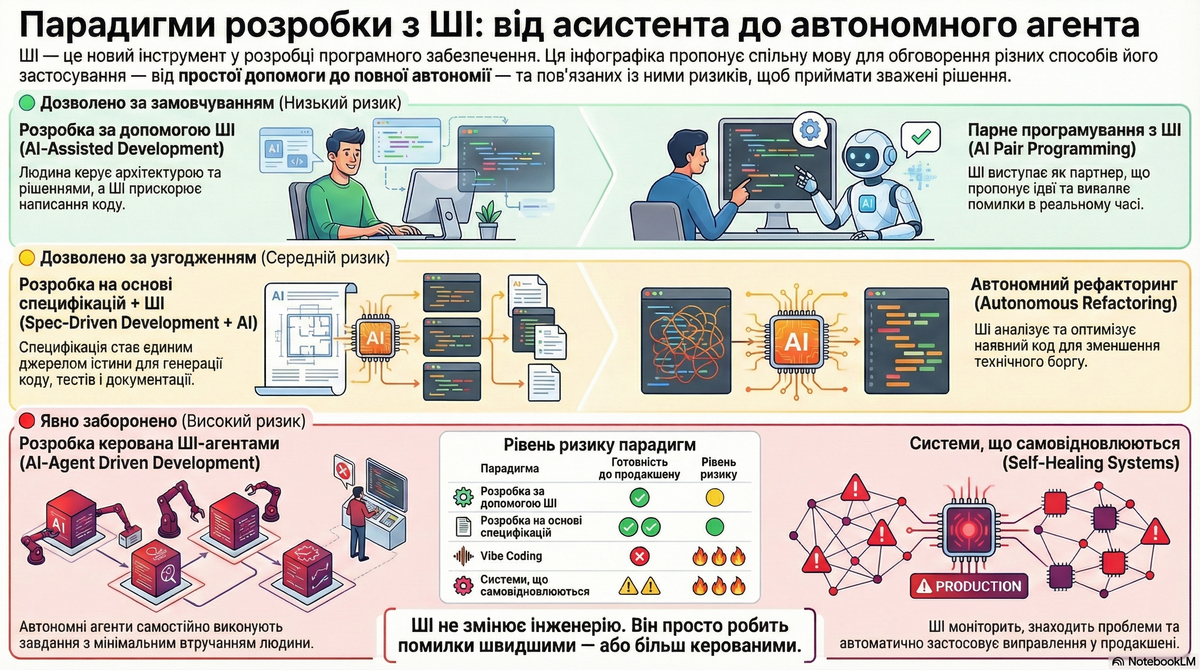
<p>В цьому році з’явилося багато термінів, які описують новий інструмент розробки – ШІ.</p>

<p>Одразу, як завжди, почалися дискусії про смак різноколірних олівців, бо одні вважають що від цього можна отримувати задоволення, а інші, що можна тільки для розмноження та й то лише після благословіння церкви.</p>

<p>В принципі можна взяти будь які правила або найкращі практики розробки чи інженерії та замінити там назву будь якого інструменнту на “ШІ” і можеш лупашити ними опонентів прямо в тім’ячко.</p>

<p>Поки бажаючі знавці обмацують цього слона і сперечаються про те, що вони намацали чи відчули, спробуємо визначитися з термінологією.</p>

<p>Треба щось просте і зрозуміле, щоб одразу тицьнути туди на мапі де ми зараз є.</p>

<p>Я теж вмію в розумні слова і тому спробуємо парадигмальний підхід.</p>

<p>Далі – без іронії. Спробуємо зафіксувати робочі визначення.</p>

<p>Мета цього документу – не оцінювати ШІ як “добре / погано”, а дати спільну мову для обговорення: що саме ми зараз робимо, який рівень ризику приймаємо, і які практики доречні у вибраному підході.</p>

<h2 id="-парадигми-короткі-описи">🧩 Парадигми: короткі описи</h2>

<h3 id="-vibe-coding">🔍 Vibe Coding</h3>

<p>Vibe Coding – це підхід, при якому розробник описує бажану функціональність мовою, зрозумілою для людини, і генерує код за допомогою ШІ без детального перегляду або редагування результату. Акцент робиться на експериментуванні, швидкому прототипуванні та довірі до ШІ, а не на ручному написанні або перевірці кожного рядка коду.</p>

<p><strong>Намір → ШІ → Код</strong></p>

<ul>
  <li>ШІ пише код на основі наміру високого рівня</li>
  <li>Мінімальний перегляд, мінімальна структура</li>
  <li>Максимальна швидкість, максимальний ризик</li>
</ul>

<p><strong>Використовувати, коли</strong></p>

<ul>
  <li>Прототипи</li>
  <li>Демо-версії</li>
  <li>Спайки</li>
  <li>Одноразовий код</li>
</ul>

<p><strong>Ніколи не використовувати для</strong></p>

<ul>
  <li>Продакшен систем</li>
  <li>Основної логіки</li>
  <li>Шляхи, чутливі до безпеки</li>
</ul>

<h3 id="-ai-assisted-development">🔍 AI-assisted development</h3>

<p>AI-assisted development (AIAD) – це використання інструментів штучного інтелекту для підтримки розробника на різних етапах розробки: від написання коду, тестування та налагодження до оптимізації та автоматизації повторюваних завдань. Розробник залишається активним учасником процесу, а ШІ виступає як помічник, що пропонує ідеї, автоматизує рутину та покращує якість коду.</p>

<p><strong>Розробка під керівництвом людини з використанням ШІ як інструменту</strong></p>

<ul>
  <li>Людина володіє архітектурою та рішеннями</li>
  <li>ШІ прискорює реалізацію</li>
  <li>Застосовуються стандартні перевірки та тестування</li>
</ul>

<p><strong>Використовувати, коли</strong></p>

<ul>
  <li>Написання виробничих функцій</li>
  <li>Підтримка тривалих кодових баз</li>
</ul>

<h3 id="-ai-powered-pair-programming">🔍 AI-Powered Pair Programming</h3>

<p>ШІ-помічники працюють разом із розробником у реальному часі, пропонуючи альтернативи, виявляючи помилки, оптимізуючи код та навіть генеруючи нові функції на основі контексту. Такий підхід зменшує час на зневадження та покращує архітектуру проєктів.</p>

<p><strong>Людина ⇄ ШІ в режимі реального часу</strong></p>

<ul>
  <li>Постійний діалог</li>
  <li>ШІ пропонує, людина вирішує</li>
  <li>Порівнянно з поєднанням програмування з сильним молодшим/середнім розробником</li>
</ul>

<p><strong>Використовуйте, коли</strong></p>

<ul>
  <li>Повсякденна розробка</li>
  <li>Вивчення незнайомих кодових баз або мов</li>
</ul>

<h3 id="-generative-ai-for-specification-and-design">🔍 Generative AI for Specification and Design</h3>

<p>ШІ використовується для автоматичної генерації архітектурних рішень, діаграм, документації та навіть тестових сценаріїв на основі вимог. Це дозволяє швидко отримати прототип системи та перевірити її на відповідність бізнес-вимогам.</p>

<p><strong>Вимоги → ШІ → Специфікації / Діаграми</strong></p>

<ul>
  <li>ШІ допомагає <em>до</em> кодування</li>
  <li>Генерує чернетки специфікацій, архітектурних діаграм, планів тестування</li>
  <li>Людина перевіряє та вдосконалює</li>
</ul>

<p><strong>Використовуйте, коли</strong></p>

<ul>
  <li>Проектування системи</li>
  <li>Дослідження архітектури</li>
  <li>Ранні етапи планування</li>
</ul>

<h3 id="-ai-augmented-spec-driven-development">🔍 AI-Augmented Spec-Driven Development</h3>

<p>AI-Augmented Spec-Driven Development – це парадигма, в якій структуровані специфікації (вимоги, архітектурні обмеження, критерії прийняття тощо) є основним джерелом для генерації коду за допомогою ШІ. Ці специфікації стають єдиним джерелом істини, яке ШІ перетворює на реалізацію, тести та документацію. Такий підхід забезпечує високу узгодженість між вимогами та реалізацією, скорочує ризики помилок і підвищує швидкість розробки.</p>

<p><strong>Специфікація → ШІ → Код + Тести</strong></p>

<ul>
  <li>Специфікація є джерелом істини</li>
  <li>ШІ генерує код і тести на основі специфікацій</li>
  <li>Найвища передбачуваність і зручність обслуговування</li>
</ul>

<p><strong>Використовується в таких випадках</strong></p>

<ul>
  <li>Основна бізнес-логіка</li>
  <li>Фінансові, безпекові або регульовані системи</li>
  <li>Великі кодові бази з тривалим терміном експлуатації</li>
</ul>

<h3 id="-ai-driven-development-aidd">🔍 AI-Driven Development (AIDD)</h3>

<p>Це парадигма, де ШІ глибоко інтегрований у всі етапи розробки – від проєктування та написання коду до тестування, оптимізації та навіть розгортання. Розробник і ШІ працюють як партнер, що значно підвищує продуктивність і якість коду.</p>

<p><strong>Людина + ШІ спільно керують процесом</strong></p>

<ul>
  <li>ШІ бере участь у проектуванні, кодуванні, тестуванні та оптимізації</li>
  <li>Людина залишається відповідальною за стратегію та обмеження</li>
</ul>

<p><strong>Використовувати, коли</strong></p>

<ul>
  <li>Команди навмисно впроваджують ШІ в SDLC</li>
  <li>Існують чіткі обмеження та процеси оцінки</li>
</ul>

<h3 id="-autonomous-refactoring-та-adaptive-coding">🔍 Autonomous Refactoring та Adaptive Coding</h3>

<p>ШІ автоматично аналізує та рефакторить код, виявляючи потенційні проблеми, пропонуючи оптимізації та адаптується до змін у проєкті. Такі системи можуть навчатися на великій кількості коду, щоб краще розуміти контекст та вимоги проєкту.</p>

<p><strong>Існуючий код → ШІ → Вдосконалений код</strong></p>

<ul>
  <li>ШІ рефакторує, оптимізує та зменшує технічний борг</li>
  <li>Працює за суворими правилами та підлягає оцінці</li>
</ul>

<p><strong>Використовується, коли</strong></p>

<ul>
  <li>Контрольований рефакторинг</li>
  <li>Оптимізація продуктивності</li>
  <li>Вдосконалення стилю та узгодженості</li>
</ul>

<h3 id="-pipeline-synthesis-та-security-scanning-orchestration">🔍 Pipeline Synthesis та Security Scanning Orchestration</h3>

<p>ШІ може автоматично генерувати конфігурації CI/CD, аналізувати безпеку коду, виявляти технічний борг та пропонувати шляхи його усунення. Це зменшує ризики та прискорює процес розгортання.</p>

<p><strong>Політика → ШІ → CI/CD та автоматизація безпеки</strong></p>

<ul>
  <li>ШІ генерує та підтримує конвеєри</li>
  <li>Автоматизує сканування безпеки та забезпечення дотримання політик</li>
</ul>

<p><strong>Використовувати, коли</strong></p>

<ul>
  <li>Автоматизація DevSecOps</li>
  <li>Зниження операційного ризику</li>
</ul>

<h3 id="-ai-agent-driven-development">🔍 AI-Agent Driven Development</h3>

<p>ШІ-агенти можуть самостійно виконувати певні завдання – від генерації коду за специфікаціями до автоматичного створення тестів, моніторингу та навіть виправлення помилок у продакшені. Це дозволяє створювати самоохоронні системи, які мінімізують втручання людини.</p>

<p><strong>Мета → ШІ-агенти → Виконання</strong></p>

<ul>
  <li>Автономні агенти розкладають та виконують завдання</li>
  <li>Мінімальне втручання людини</li>
</ul>

<p><strong>Використовувати з особливою обережністю</strong></p>

<ul>
  <li>Внутрішні інструменти</li>
  <li>Чітко обмежені завдання автоматизації</li>
</ul>

<h3 id="-self-healing-systems">🔍 Self-Healing Systems</h3>

<p>ШІ-агенти моніторять систему у продакшені, виявляють проблеми, генерують латки та автоматично їх застосовують, забезпечуючи високу надійність та мінімізуючи простої.</p>

<p><strong>Сигнали під час виконання → ШІ → Виправлення → Розгортання</strong></p>

<ul>
  <li>ШІ контролює продакшен та автоматично застосовує виправлення</li>
  <li>Найвища автономність, найвищий ризик</li>
</ul>

<p><strong>Не рекомендується за замовчуванням</strong></p>

<ul>
  <li>Тільки з суворими запобіжними заходами</li>
  <li>Тільки для некритичних систем</li>
</ul>

<h3 id="-порівняльна-таблиця">📊 Порівняльна таблиця</h3>

<table>
  <thead>
    <tr>
      <th>Парадигма</th>
      <th>Хто веде</th>
      <th>Джерело істини</th>
      <th>Типове застосування</th>
      <th>Готовність до продакшену</th>
      <th>Ризик</th>
    </tr>
  </thead>
  <tbody>
    <tr>
      <td>Vibe Coding</td>
      <td>ШІ</td>
      <td>Prompt</td>
      <td>Прототипи, demo</td>
      <td>❌</td>
      <td>🔥🔥🔥</td>
    </tr>
    <tr>
      <td>AI-assisted Dev</td>
      <td>Людина</td>
      <td>Код</td>
      <td>Продакшн-фічі</td>
      <td>✅</td>
      <td>🟡</td>
    </tr>
    <tr>
      <td>AI Pair Programming</td>
      <td>Людина + ШІ</td>
      <td>Код</td>
      <td>Щоденна розробка</td>
      <td>✅</td>
      <td>🟡</td>
    </tr>
    <tr>
      <td>Generative Spec &amp; Design</td>
      <td>Людина</td>
      <td>Spec</td>
      <td>Архітектура, планування</td>
      <td>⚠️</td>
      <td>🟡</td>
    </tr>
    <tr>
      <td>Spec-Driven + AI</td>
      <td>Специфікація</td>
      <td>Spec</td>
      <td>Core-системи</td>
      <td>✅✅</td>
      <td>🟢</td>
    </tr>
    <tr>
      <td>AI-Driven Dev</td>
      <td>Людина + ШІ</td>
      <td>Mixed</td>
      <td>End-to-end dev</td>
      <td>✅</td>
      <td>🟡</td>
    </tr>
    <tr>
      <td>Autonomous Refactoring</td>
      <td>ШІ</td>
      <td>Code + Rules</td>
      <td>Техборг, cleanup</td>
      <td>⚠️</td>
      <td>🟡</td>
    </tr>
    <tr>
      <td>Pipeline &amp; Security AI</td>
      <td>Policy</td>
      <td>Policy</td>
      <td>CI/CD, Security</td>
      <td>✅</td>
      <td>🟡</td>
    </tr>
    <tr>
      <td>AI-Agent Driven Dev</td>
      <td>ШІ-агенти</td>
      <td>Goal / Policy</td>
      <td>Автоматизація</td>
      <td>⚠️</td>
      <td>🔥🔥</td>
    </tr>
    <tr>
      <td>Self-Healing Systems</td>
      <td>ШІ</td>
      <td>Runtime signals</td>
      <td>Ops / reliability</td>
      <td>⚠️⚠️</td>
      <td>🔥🔥🔥</td>
    </tr>
  </tbody>
</table>

<hr />

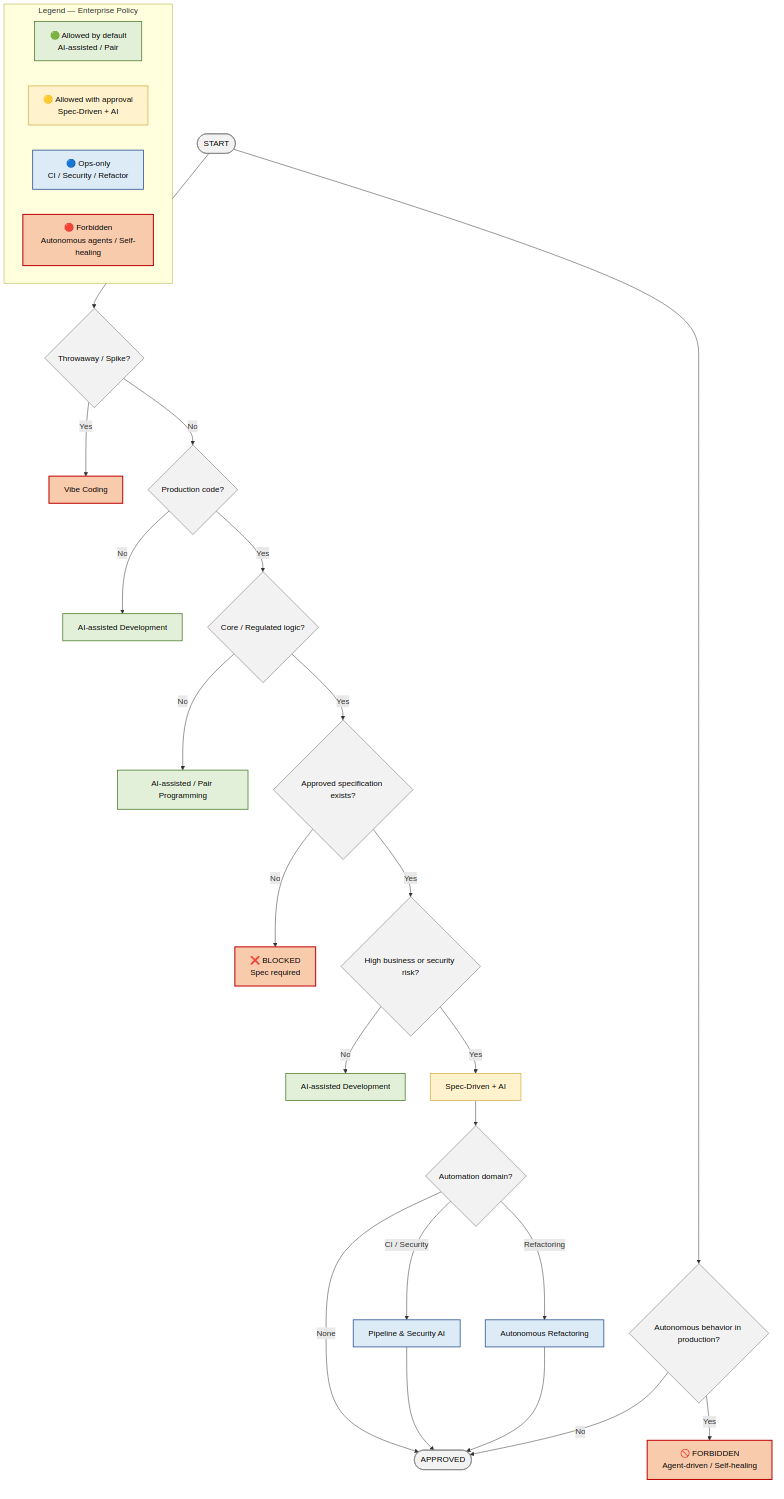
<h2 id="-парадигми-розробки-за-допомогою-ші--дерево-рішень">🌳 Парадигми розробки за допомогою ШІ – Дерево рішень</h2>

<p>Дерево рішень про те, про що в будь-який конкретний момент йдеться.
Це дерево визначає режим розробки, а не конкретний інструмент.</p>

<h3 id="-політики">🏢 Політики</h3>

<h4 id="-дозволено-за-замовчуванням">🟢 Дозволено за замовчуванням</h4>

<ul>
  <li>Розробка за допомогою ШІ</li>
  <li>Парне програмування за допомогою ШІ</li>
  <li>Рефакторинг <em>з рев’ю</em></li>
</ul>

<h4 id="-дозволено-за-умови-явного-схвалення">🟡 Дозволено за умови явного схвалення</h4>

<ul>
  <li>Розробка на основі специфікацій за допомогою ШІ</li>
  <li>Код, згенерований ШІ, у базовій логіці</li>
  <li>Будь-який ШІ у регульованих доменах</li>
</ul>

<h4 id="-тільки-для-операційної-діяльності">🔵 Тільки для операційної діяльності</h4>

<ul>
  <li>Генерація CI/CD</li>
  <li>Сканування безпеки</li>
  <li>Забезпечення дотримання залежностей та політики</li>
</ul>

<h4 id="-явно-заборонено">🔴 Явно заборонено</h4>

<ul>
  <li>Розробка на основі ШІ-агентів у продакшені</li>
  <li>Системи самовідновлення</li>
  <li>Автономні зміни у продакшені без схвалення людини</li>
</ul>

<p><img src="/assets/images/posts/ai-as-development-tool/decision-tree-04-784x1499.png" alt="Дерево рішень" /></p>

<h2 id="в-цілому">В цілому</h2>

<p>ШІ не змінює інженерію. Він лише робить її помилки швидшими – або керованішими.</p>]]></content><author><name></name></author><category term="methodology" /><category term="AI" /><category term="vibe-coding" /><category term="methodology" /><category term="AIAD" /><category term="spec-driven" /><summary type="html"><![CDATA[Робочі визначення парадигм розробки з ШІ — від Vibe Coding до Self-Healing Systems. Спільна мова для обговорення того, що саме ми робимо і який рівень ризику приймаємо.]]></summary><media:thumbnail xmlns:media="http://search.yahoo.com/mrss/" url="https://valpere.github.io/assets/images/posts/ai-as-development-tool/infographics-2-1200x671.png" /><media:content medium="image" url="https://valpere.github.io/assets/images/posts/ai-as-development-tool/infographics-2-1200x671.png" xmlns:media="http://search.yahoo.com/mrss/" /></entry></feed>